Klaviyo
Last updated: November 6, 2026
Connect Klaviyo to Polar to see your email and SMS campaigns, flows, lists and Klaviyo-attributed revenue next to your other channels.
Before you start
You need the Admin role in Polar to add connectors.
You need a Klaviyo user that can create API keys.
If you use Shopify, connect your store first so you can link it to Klaviyo. See Shopify.
Get your Klaviyo keys
Polar needs two keys from Klaviyo: your Public API Key and a Private API Key.
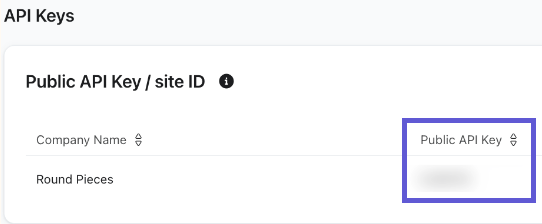
In Klaviyo, go to Settings > API Keys.
Copy your Public API Key. Klaviyo also calls it your site ID.
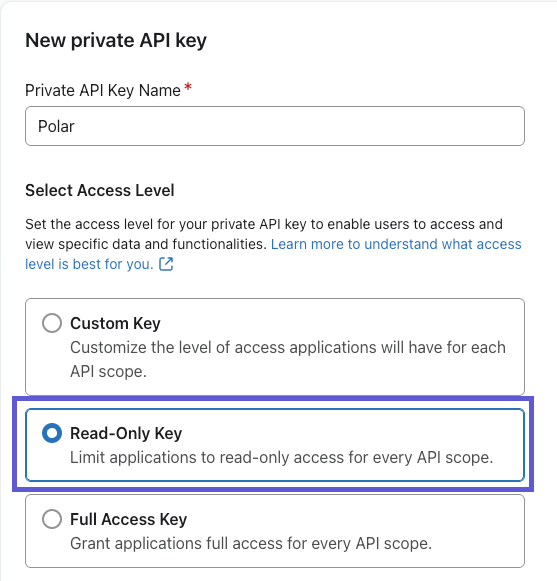
Click Create Private API Key and name it "Polar".
Select Read-Only Key and create the key.
Copy the private key. It starts with
pk_.
Connect Klaviyo
Go to the Connectors page and search for Klaviyo.
Click Connect.
Select the Shopify store this Klaviyo account belongs to.
Paste your Public API Key into Klaviyo Public API Key / site ID.
Paste your private key into Klaviyo Private API Key.
Click Connect to Polar Analytics.
The first sync loads your Klaviyo history. It usually finishes within 24 hours, and can take 2 to 3 days for large accounts. See Data Syncs.
Where to find your Klaviyo data
Where | What you see |
Email marketing in the left menu | New subscribers, campaign and flow performance by message and by date, and expected next order |
Every Klaviyo metric, broken down by campaign, flow and more | |
Acquisition tab | Klaviyo as a channel in Polar Pixel attribution, when your emails and SMS use tracking parameters. See Klaviyo Tracking Parameters Guide |
Ask Polar can answer questions about your Klaviyo data directly. For example: "Which Klaviyo flows drove the most revenue last month, and what was each flow's click rate?"
Metrics
Group | Metrics |
Email campaigns and flows | Received, Unique Opened, Unique Clicked (with or without bots), Unique Bounced, Marked as Spam, Unsubscribed, Placed Orders, Revenue, and the matching rates |
SMS campaigns and flows | Recipients, Delivered, Failed, Clicks, Opt-Outs, Orders, Revenue, Credits, Segments, Send Cost, ROI, and the matching rates |
Lists | Subscribed to List, Unsubscribed from List, List unsubscribes (incl. email marketing) |
Orders | Total Placed Orders, Total Revenue, Total Customers, Average Order Value, Discounts, Tax, Tips |
Campaign and flow orders and revenue are dated by the day the message was sent, not the day of the order.
FAQs
Why is my Klaviyo revenue on a different day than in Shopify?
Polar dates campaign and flow revenue by the send day of the message that drove it, the same way Klaviyo's campaign and flow reports do. Shopify dates the order by when it was placed.
Why do new subscribers in Polar differ from Klaviyo?
Polar's new subscriber count leaves out contacts that were imported or added manually. It only counts people who subscribed themselves.
I get an error when I connect
Check that:
The private key starts with
pk_and has Read-Only access to every scope.You pasted the Public API Key into the site ID field, not the private key.
The key wasn't deleted or revoked in Klaviyo.