Understanding the Funnel tab
Last updated: November 5, 2026
The Funnel tab shows how visitors move from landing on your site to completing a purchase, so you can see where they drop off. You'll find it under Acquisition.
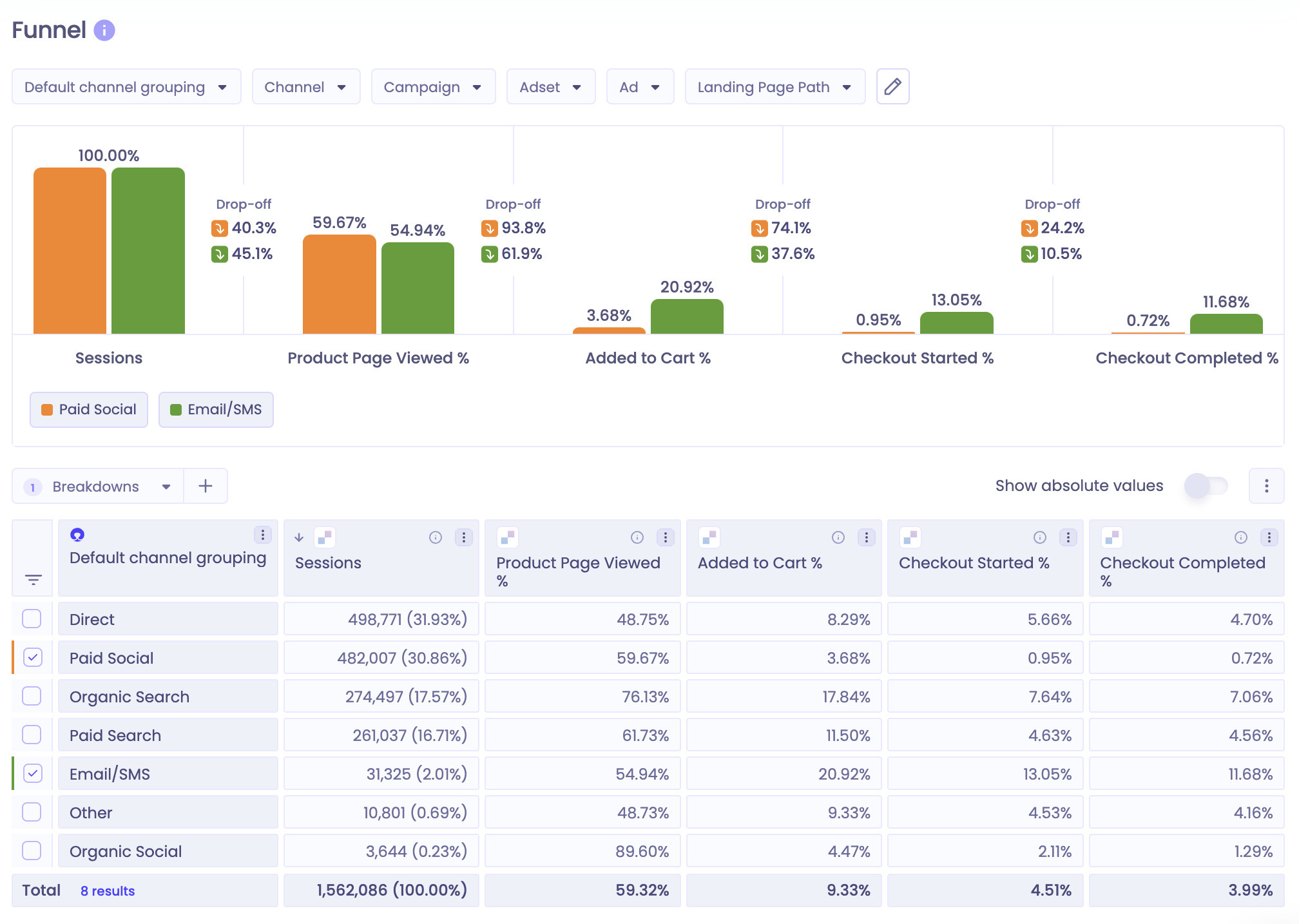
Funnel stages
The funnel uses data from the Polar Pixel. Each stage is shown as a share of sessions, and the drop-off percentage shows how many visitors left between one stage and the next.
Stage | What it counts | Common reasons for a drop-off before this stage |
|---|---|---|
Sessions | Visits tracked by the Polar Pixel. A session ends after 30 minutes of inactivity. | Not applicable |
Product Page Viewed | Sessions where a visitor loaded a product page | Landing pages that don't match the ad, low-intent visitors, navigation issues |
Added to Cart | Sessions where a visitor added a product to their cart | Price concerns, unclear product details, few trust signals |
Checkout Started | Sessions where a visitor started checkout | Usability problems, unexpected costs such as shipping |
Checkout Completed | Sessions that ended in a purchase | Payment issues, last-minute hesitation |
Using the Funnel tab
Feature | What it does |
|---|---|
Filters and breakdowns | Narrow the funnel by channel grouping, campaign or landing page |
Show Absolute Values | Switch between percentages and session counts |
Date range | Compare the funnel across periods, for example before and after a site change. Data starts from when you installed the Polar Pixel. See Choosing a date range. |
To get more out of the funnel:
Compare sources and pages. Filter to one channel or landing page to see which audiences convert best.
Use custom dimensions. Group campaigns by market (for example "-UK" or "-DE") or landing pages by type (collection, product or blog). See Understanding Custom Dimensions.
Use Views. If you have more than one store, look at one store at a time. See Understanding Views.
FAQs
Why don't my session counts match Shopify or Google Analytics?
Each platform defines and tracks sessions differently, and some visitors opt out of the Polar Pixel. Use the funnel to compare sources and stages within Polar rather than to match other tools. For details, see Why do Polar Pixel sessions differ from GA4 or Shopify?
Which session metric does the funnel use?
Polar Pixel Page Viewed Sessions, which counts sessions with at least one tracked page view. All stages are shown relative to this metric. The funnel doesn't use Polar Pixel Sessions, which also includes synthetic sessions for orders the Pixel didn't track.
Why can a later stage be higher than an earlier one?
Visitors can skip stages, for example by checking out from a saved cart on a return visit. Each stage is a share of all sessions, not a step-by-step path within one session.