Ask Polar
Last updated: September 30, 2026
Overview
Ask Polar is Polar’s AI-powered analytics assistant. It helps ecommerce teams uncover insights instantly — without building dashboards, writing SQL, or doing manual data pulls.
Built directly on Polar’s semantic layer, Ask Polar understands your brand’s data structure, key metrics, and ecommerce terminology. That means every answer you get is consistent, explainable, and tailored to your business logic.
With Ask Polar, you can:
Ask complex business questions in plain English
Instantly visualize answers with charts and tables
Save reports to dashboards so you can find, reuse, and schedule them
Collaborate across teams through shared prompts and Slack integrations
You can think of Ask Polar as your AI data analyst, available 24/7 to give you the clarity you need to make data-backed decisions faster.
What Ask Polar Can Do
Ask Polar is powered by the same semantic layer that fuels all Polar dashboards and BI reports — so every metric (from ROAS to CAC to LTV) aligns with your existing analytics setup.
Conversational context memory – Ask follow-ups like “compare that to last month” or “show by channel.”
Ecommerce-aware language understanding – Recognizes ecommerce-specific terms like “new customers,” “ad spend by platform,” or “top SKUs.”
Instant visualizations – Generates bar charts, line graphs, and tables directly in Polar.
Saved prompts – Store frequent questions (“weekly growth report,” “revenue by campaign”) for easy reuse.
Team sharing – Share visual outputs or data summaries directly with teammates or in Slack.
Ask Polar is built to minimize friction between curiosity and insight — so whether you’re tracking daily performance or preparing for a quarterly review, your answers are only one question away.
How to Use Ask Polar
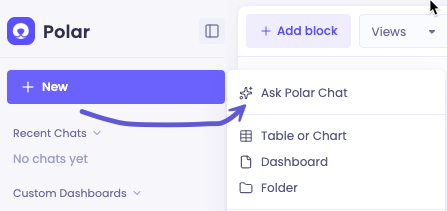
You can access Ask Polar from the top navigation bar of your Polar workspace. Once open, simply type a question in plain English, and Ask Polar will return a visual or tabular result instantly.
Example prompts
“What was my blended CAC last quarter vs this quarter?”
“Which campaigns had the highest ROAS last week?”
“Show me revenue by SKU for new customers only.”
“What’s our Meta ad spend last month?”
“Can you save this to a dashboard?”
Ask Polar automatically references your semantic model, meaning all metrics come from your own verified data.
Tips for best results
Be specific with time ranges (e.g., “last 7 days,” “last quarter”)
Include dimensions (e.g., “by channel,” “by campaign”)
Use saved prompts for recurring questions
Save reports you want to keep to a dashboard — just ask “Can you save this to a dashboard?”
Ask Polar learns from your queries over time, so it becomes more accurate the more you use it.
Ask Polar vs. AI Tools like Claude or ChatGPT
Ask Polar isn’t just another chatbot — it’s deeply integrated into your Polar data environment. While tools like Claude or ChatGPT can connect to Polar’s MCP, they operate as general-purpose models. Ask Polar is specifically built for ecommerce analysis and uses Polar’s validated metrics framework.
Feature | Ask Polar | Claude w/ Polar MCP |
Data Source | Polar Semantic Layer | Polar Semantic Layer |
Context Handling | Remembers context within each chat | Limited by token length |
Visualization | Inline charts and tables | Depends on the AI tool |
Focus | Ecommerce BI & attribution | General reasoning |
This ensures Ask Polar delivers consistent, audit-ready answers aligned with your BI dashboards and reports.
FAQs
Is there a difference between prompting Ask Polar versus using ChatGPT/Claude with the Polar MCP connection?
Both use Polar’s semantic layer, so metrics are consistent. However, Claude can hit token or context limits in longer chats, while Ask Polar is optimized for multi-step analytical workflows.
Who can access Ask Polar?
Ask Polar is available to all Polar users.
Does Ask Polar understand custom metrics or dimensions?
Yes. Ask Polar automatically recognizes and applies your custom metrics and groupings (like “Profit after influencer spend” or “US-only revenue”).
Can Ask Polar generate visual reports?
Yes. Ask Polar can generate charts, graphs, and data tables right in your chat. To keep one for later, save it to a dashboard (see below).
Where can I find a report Ask Polar created?
Reports Ask Polar creates stay in the chat where you asked for them. To come back to one later, reopen that chat in Ask Polar. To keep a report somewhere easier to find and share, save it to a dashboard.
Can I save an Ask Polar report to a dashboard?
Yes. The quickest way is to ask directly, for example: “Can you save this to a dashboard?”
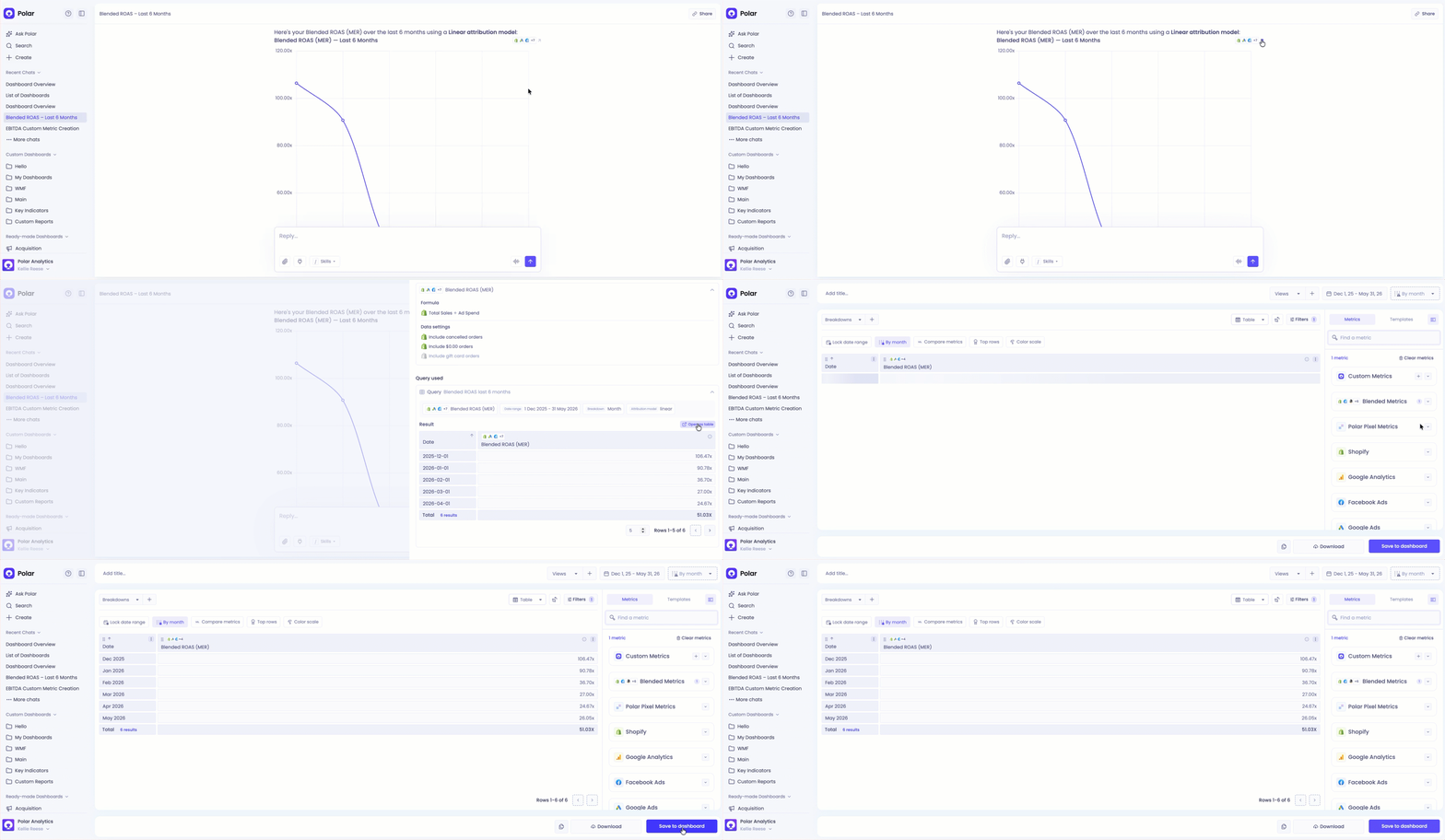
You can also do it manually: select the pop-out arrow to reveal the query the agent used, then open the table in a new tab. On the new tab you can save the report to a dashboard.
Can Ask Polar email me a report on a schedule?
Not yet, but it’s planned! For now, save the report to a dashboard, then set up an Automation to email it on the schedule you choose. See Understanding Automations for setup steps.
Who can see my Ask Polar chats?
Ask Polar chats are private to each user and workspace. This means:
Only you can see the chats you start — they’re not visible to other users.
Chats are not shared across workspaces. If you switch workspaces, you’ll only see the conversations you created within that specific workspace.
In short, every user’s Ask Polar experience is fully personal and workspace-specific.