Understanding Data Discrepancies Between Polar and Google Analytics
Last updated: September 25, 2026
If the numbers in Polar don't match what you see in Google Analytics 4 (GA4), you're not alone. This article explains the most common causes: GA4's tracking limits, data latency, and how GA4 structures its data.
GA4 reports fewer transactions than Shopify or the Polar Pixel
GA4 doesn't capture every transaction on your site. Transactions are missed when:
Shoppers opt out of analytics tracking or decline cookies.
Ad blockers, strict browser privacy settings, or disabled JavaScript prevent GA4 from firing.
A session goes over GA4's tracking limits.
Because of this, don't rely on GA4 transaction data alone. Shopify is the source of truth for orders. To see the gap for yourself, build a custom table comparing Shopify orders, Polar Pixel conversions, and GA4 transactions over the same period.
Data latency from Google Analytics
GA4 can take up to 12 hours to fully process data. Until then, the data is still in progress and can keep changing. Once Google finalizes it, Polar pulls and processes the data at its next refresh, which can add more time depending on your refresh frequency. Read more in Google's guide to GA4 data freshness.
An example of how delays stack up
A shopper starts a session on their phone before bed and turns the phone off before the tracking event is sent.
The next morning, 8 hours later, the phone sends the event to Google.
Google takes up to 12 hours to process it.
Polar takes up to 4 hours to sync it.
Total delay: 8 + 12 + 4 = 24 hours. This is why even the previous day's data can look incomplete at first.
Need finalized data faster? Google Analytics 360 shortens Google's processing time, and you can ask your Customer Success Manager about enabling hourly refreshes in Polar.
GA4 totals don't always add up
GA4 uses different datasets for its Reports, its Explore tool, and the API that third-party tools like Polar use. By design, GA4 also can't guarantee that totals match across every combination of metrics and breakdowns. So you can see inconsistencies even within GA4 itself.
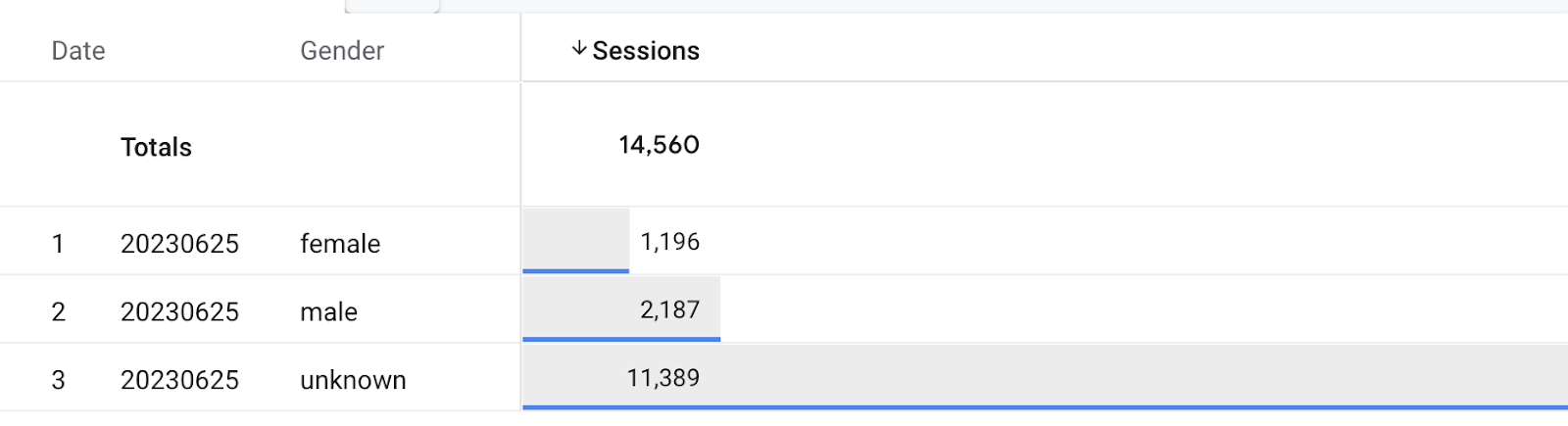
Example: total sessions vs. sessions by gender
GA4 may show 14,560 total sessions:

But broken down by gender (Male 11,389, Female 2,187, Unknown 1,196), the sessions add up to 17,772, more than the total:
Example: engaged sessions by session type
GA4 may show 300,000 total engaged sessions, while the breakdown by session type (Direct 242,769, Referral 50,295, Paid 28,537) adds up to 321,601:
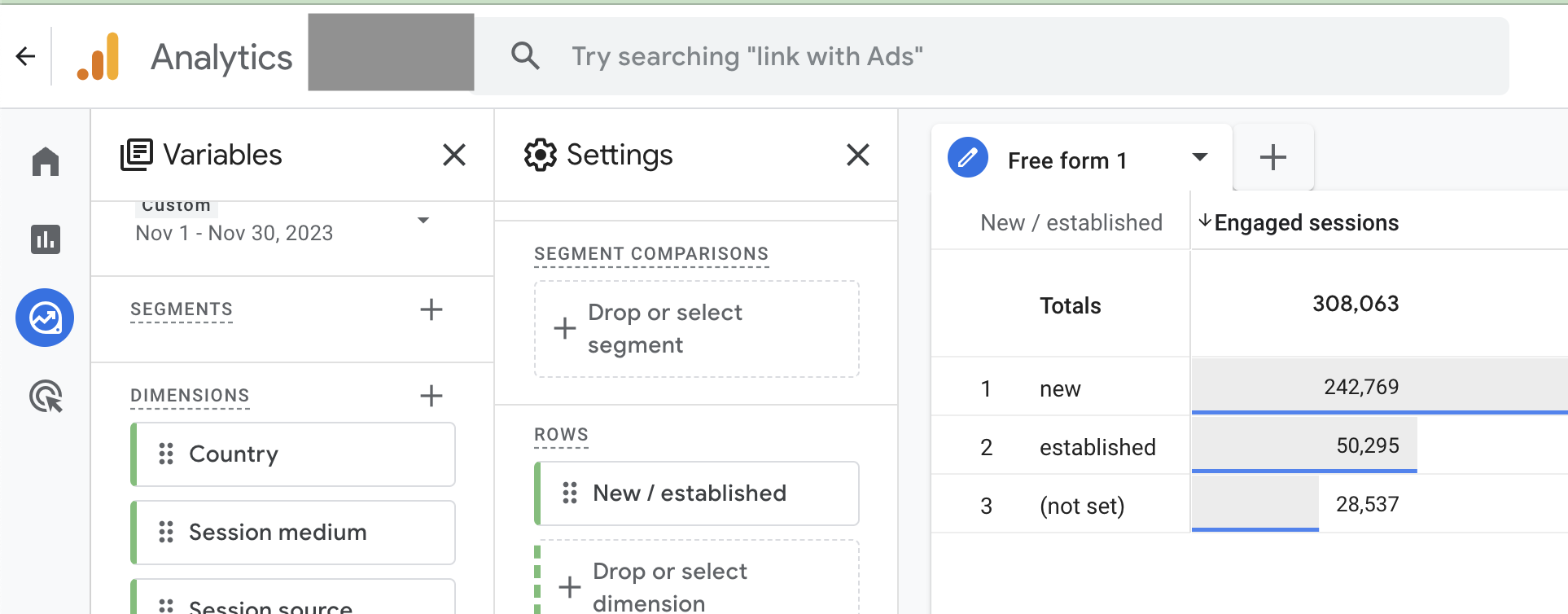
This is expected GA4 behavior. Google has confirmed the limitation, and there's currently no fix.
How Polar queries GA4
Polar queries the GA4 API with a specific set of dimensions to give you the most useful breakdowns. These queries can't be replicated exactly in the GA4 interface, so small differences are expected, especially for sessions broken down by channel, device, or location.
Polar doesn't modify or recalculate GA4 values. The numbers in Polar are exactly what GA4 returns through its API.
Want sessions closer to GA4's standard reports? Polar can set up a custom Sessions metric using an alternate set of breakdowns (such as Session Default Channel Group) that more closely mirrors GA4's reports. Reach out through the in-app chat to request it.
GA4 isn't built for attribution
GA4's API doesn't provide granular, event-level data. That makes it hard to tie GA4 traffic to Shopify orders accurately, and blending GA4 and Shopify data can produce misleading metrics. For attribution, Polar recommends the Polar Pixel instead. See Understanding Polar Pixel & Attribution.