Understanding Attribution Models
Last updated: October 30, 2026
An attribution model decides how the credit for each order is split across the marketing touchpoints in a customer's journey. This article covers the models available in Polar, when to use each one, and custom models built for your account.
How attribution models work
Take this journey:
A customer clicks a TikTok ad.
They come back through Google Search.
They click a Facebook retargeting ad.
They buy.
Which channel gets credit for the order depends on the model you choose. Models only use touchpoints the Polar Pixel tracked inside your lookback window. Polar Pixel metrics use First Click by default.
Standard models
Model | How credit is split | Best for |
|---|---|---|
First Click | 100% to the first touchpoint | Finding the channels that bring in new customers. Ignores the channels that close the sale. |
Last Click | 100% to the last touchpoint before the order | Optimizing the channels that close sales. Undervalues upper-funnel channels. |
Linear | Split evenly across all touchpoints. With 4 touchpoints, each gets 25%. | Longer consideration cycles and balanced multi-channel analysis |
U-Shaped | 40% to the first touchpoint, 40% to the last, and 20% split across the ones in between | Full-funnel strategies where both acquisition and closing matter |
Time Decay | Touchpoints closer to the order get more credit than earlier ones | Longer buying cycles where momentum matters |
Full Paid Overlap | Every paid channel in the journey gets 100% credit. Totals add up to more than 100%. | Seeing how much your paid channels overlap |
Full Paid Overlap + Facebook Views | Same as Full Paid Overlap, plus eligible Facebook view-through conversions | Brands with significant Meta spend that want to include view-through |
Full Impact | All channels, paid and non-paid, get credit, allocated with a Shapley value calculation | Finding assist-heavy channels. See Understanding the Full Impact model. |
Attribution settings
Three settings work on top of whichever model you choose.
Setting | What it does |
|---|---|
Is Paid Only | Only paid touchpoints can receive credit. Organic and direct touchpoints are removed before the model runs. |
Lookback Window | How far back before the order a touchpoint can be and still receive credit. Choose a number of days or unlimited. |
Cash vs. Accrual | Cash dates credit to the day of the order. Accrual dates it to the day of each touchpoint. |
For the details, see Understanding Attribution Settings.
Choosing a model
There's no single correct model. Each one answers a different question.
If your goal is to... | Use |
|---|---|
Identify acquisition drivers | First Click |
Optimize conversion efficiency | Last Click |
Analyze full-funnel contribution | Linear |
Balance awareness and closing | U-Shaped |
Weight recent touchpoints more | Time Decay |
Understand paid channel overlap | Full Paid Overlap |
Include Meta view-through | Full Paid Overlap + Facebook Views |
Measure every channel's participation | Full Impact |
You'll learn the most by comparing models side by side:
Strong in First Click but weak in Last Click: the channel drives acquisition.
Strong in Last Click but weak in First Click: the channel closes sales, often through retargeting.
Strong in Full Paid Overlap: the channel often assists other paid channels.
Strong in Full Impact: the channel contributes across the whole journey.
Full Paid Overlap and Full Impact give credit to several channels per order, so their totals are higher than your actual sales. Use them to understand overlap, not for ROAS.
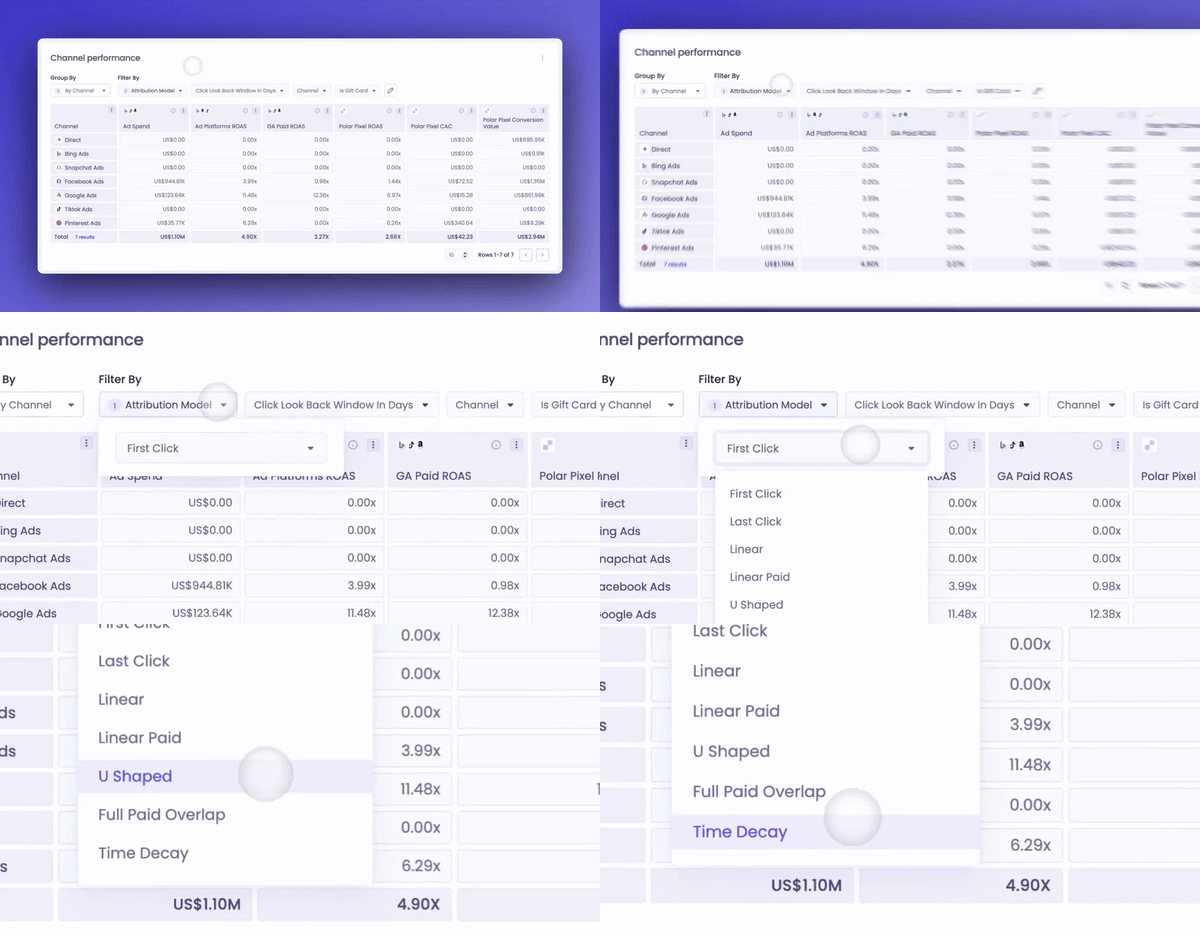
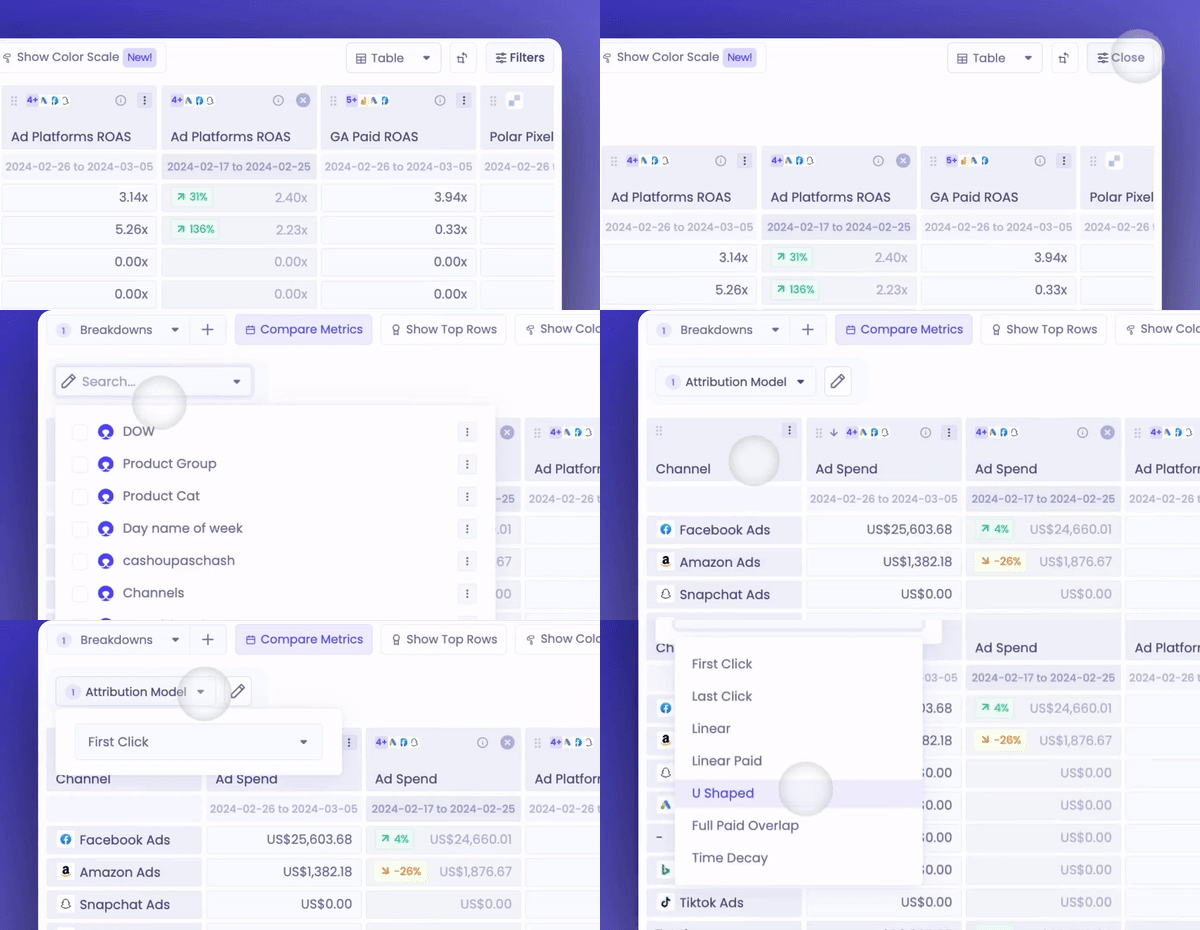
Change the model in a report
In Channel Performance:
In a custom table:
Custom attribution models
If none of the standard models matches how your team thinks about marketing, Polar can build a custom model for your account. A custom model can change which touchpoints count, how much credit each one gets, and whether new and returning customers follow different rules. It can also use other data, such as post-purchase survey answers.
Once it's live, the custom model appears in the attribution model selector next to the standard models. You choose it per report, like any other model. It can use the Lookback Window setting, or have a fixed window built in.
Examples
These models were built for specific customers. Your model's rules depend on what you want to measure.
Example | How it works |
|---|---|
Prospecting-weighted | For new-customer orders, the first touch gets more credit when it's a prospecting campaign than when it's brand search, email or organic. Each later ad gets half the credit of the one before. Brand search, email, SMS, organic and direct get no credit after an ad. Repeat orders use U-Shaped. |
U-Shaped with a fixed 30-day window | Splits credit like the standard U-Shaped model (40% first, 40% last, 20% in between), but only counts touchpoints from the 30 days before the order. The window is built into the model, so every report that uses it applies 30 days without changing the Lookback Window setting. |
Last non-direct (GA4-style) | 100% of the credit goes to the last click that isn't Direct. Direct only gets credit when the whole journey is Direct. For example, Meta ad → email → Direct purchase gives 100% to email. Results can differ from GA4 because Polar uses its own Pixel journeys. |
Halving weights | The first marketing touch gets the most credit, and each later touch gets half as much as the one before, scaled to 100%. One touch gets 100%. Two touches get 66.7% and 33.3%. Three get 57.1%, 28.6% and 14.3%. Direct and unknown touches get no credit when there are marketing touches. |
Get a custom model
Write down the question you want attribution to answer and the rules you'd like, for example which touchpoints count, how credit is split, and any extra data such as survey answers.
Send it to your CSM or through the in-app chat.
Once the model is live, select it in the attribution model selector and compare it with the standard models.
Custom models change how credit is split. They don't measure whether a channel caused a sale. For that, see Causal Lift FAQ.
FAQs
Which model do Polar Pixel metrics use by default?
First Click, with an unlimited lookback window. You can change the model and lookback in each report.
Can I make a custom model the default for my workspace?
No. There's no workspace default for the model or the lookback window. Select the custom model in each report where you want to use it.
Can I build a custom model myself?
No. Custom models are built by the Polar team based on the rules you describe.
Why do totals differ slightly between models?
Small differences come from rounding at high precision, especially in Linear and other multi-touch models. They're expected.